分类: apptovid

apptovid

  • Mobile App Ad Creative Testing: How to Generate More Variations

    For mobile app advertisers, campaign performance is often limited by the number and quality of creative ideas available for testing. A media buyer can adjust audiences, bids, and budgets, but those changes cannot compensate for a creative library that is too small or too repetitive.

    Mobile app ad creative testing is the process of comparing different messages, openings, demonstrations, and formats to discover which creative ideas attract and convert the intended audience.

    AI makes it easier to increase creative volume, but generating more videos is not the same as running a good test. The most useful approach is to create structured variations where each version tests a meaningful hypothesis.

    What should app marketers test?

    Test the opening hook

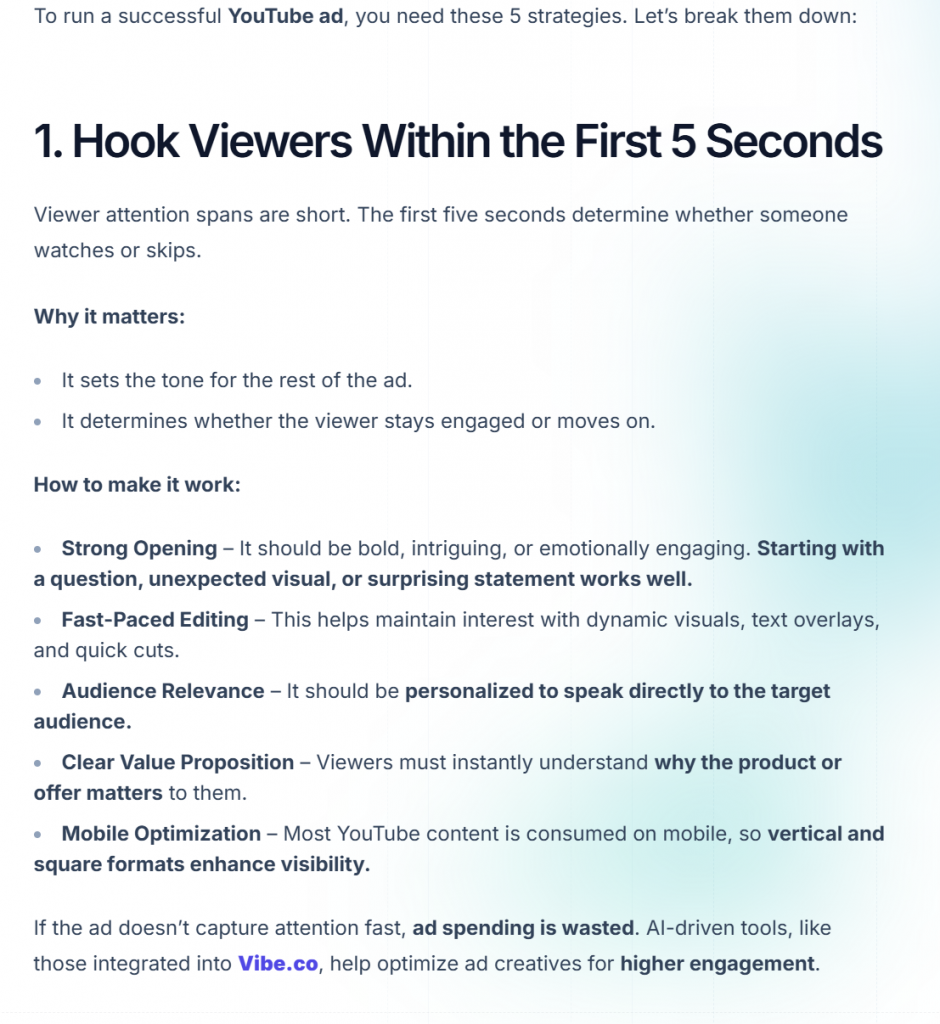
    The first few seconds determine whether a viewer continues watching. Test different ways to introduce the same product:

    • A direct question
    • A common frustration
    • A bold outcome
    • A short user scenario
    • A visual demonstration before the explanation

    For example, a budgeting app could open with “Where did your money go this month?” or begin by showing an expense being categorized automatically. These are different creative hypotheses even though they promote the same feature.

    Test the core benefit

    An app may have many features, but users usually respond to one primary outcome. Test different benefits such as saving time, reducing effort, improving confidence, learning faster, or making a task more enjoyable.

    The winning message is not always the feature that the product team considers most important. Testing helps reveal which benefit is most compelling to the target audience.

    Test the presentation format

    The same message can be delivered as a story, product walkthrough, animation, or presenter-style recommendation. Different formats may attract different audience segments.

    For example, a productivity app may use an animated explainer for people who want to understand the workflow and a digital-human video for people who respond better to personal recommendations.

    Test the audience context

    The context around the app matters. A fitness app can be shown in a morning routine, a busy workday, or a post-holiday reset. A language app can be presented through travel, work, or casual conversation.

    Changing the context helps determine which user situation creates the strongest motivation to install.

    A simple creative testing framework

    Step 1: Define one hypothesis

    Each group of videos should answer one question. Examples include:

    • Does a time-saving message outperform a money-saving message?
    • Does a product demonstration outperform a presenter introduction?
    • Does a problem-focused hook outperform a result-focused hook?

    Avoid changing every element at once. When the hook, script, format, and audience all change together, it becomes difficult to understand why one version performed better.

    Step 2: Create a small, meaningful batch

    Start with several variations rather than one “perfect” video. A useful batch may include three hooks, two benefits, and two presentation formats. This creates a set of distinct concepts without requiring a large production budget.

    AI can help generate the first version of each concept quickly, while the marketing team decides which ideas deserve further editing.

    Step 3: Keep the product proof consistent

    Use accurate screenshots and show the real product experience. If every video uses different claims or unrelated visuals, performance data becomes harder to interpret and the ads may create the wrong expectations.

    Step 4: Measure the right signals

    Depending on the campaign objective, review metrics such as thumb-stop rate, video hold rate, click-through rate, install rate, cost per install, and downstream conversion. A low cost per install is not automatically a win if the users do not activate, subscribe, or make a purchase.

    Step 5: Turn winners into new variations

    When a concept performs well, do not stop at the original version. Create new openings, lengths, captions, voices, and visual contexts around the same underlying idea. This lets the team extend a winning angle while reducing creative fatigue.

    How AI improves the creative testing process

    Traditional production tends to encourage teams to invest heavily in a small number of polished videos. AI-assisted production makes it more practical to explore multiple directions before committing to a larger production effort.

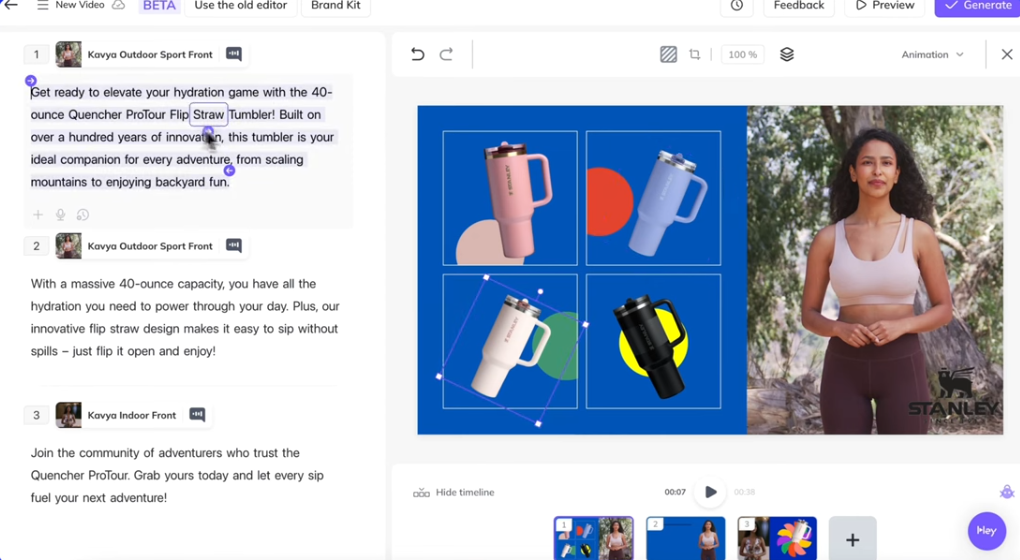
    With Apptovid, a team can provide an app description and screenshots, then generate story-based, animated explainer, or digital-human concepts for short-form advertising. The output is not a replacement for campaign analysis. It is a faster way to create the creative options that analysis requires.

    Common mistakes to avoid

    • Testing only cosmetic changes instead of different ideas
    • Making the opening too slow
    • Hiding the product until the end of the video
    • Using claims that the app cannot support
    • Treating installs as the only success metric
    • Stopping after one test instead of building a repeatable system

    Build a larger app creative library with Apptovid

    Apptovid is designed for app teams that need more advertising concepts for user acquisition campaigns. Start with your app description and screenshots, choose a creative format, and create short-form videos that can support your next testing cycle.
    Explore Apptovid for mobile app creative testing

  • How to Create Video Ads for Mobile Apps with AI

    Launching a mobile app is only the beginning. To acquire users, app teams also need a steady supply of advertising creatives for channels such as TikTok, Meta, Google Ads, and YouTube.

    The challenge is that producing a new video ad traditionally requires a script, designer, editor, voiceover, actors, and several rounds of revisions. This process can be too slow for a small app team and too expensive when a growth team needs dozens of concepts every month.

    AI can simplify the first stage of production. With the right inputs, an AI app video ad generator can turn an app description and screenshots into several short-form ad concepts that are ready for creative testing.

    What makes a good mobile app video ad?

    A mobile app video ad should communicate value quickly. It does not need to explain every feature. Its job is to make the right audience understand three things:

    1. What problem does the user have?
    2. How does the app help solve it?
    3. Why should the user learn more or install the app?

    Strong app ads usually have a clear opening hook, a simple product demonstration, and a direct call to action. The message should be understandable even when the viewer is watching without sound, so captions and visual context are important.

    The basic workflow for creating an app video ad with AI

    1. Start with the app’s real value proposition

    Before generating a video, write down the main user outcome in one sentence. For example:

    • “Plan a weekly workout in less than two minutes.”
    • “Turn a long document into a short summary.”
    • “Find affordable flights without checking multiple websites.”

    The outcome is more useful than a list of technical features because it gives the script a clear direction.

    2. Prepare the app description and screenshots

    Useful inputs include the app’s store description, website copy, onboarding text, and screenshots of the core workflow. Choose screenshots that show the product in action rather than only showing a logo or a welcome screen.

    The more clearly the input assets show the user journey, the easier it is to create a video that feels relevant to the actual product.

    3. Generate different creative angles

    Do not create only one version of an ad. A single app can be presented through several angles:

    • A problem-and-solution story
    • A quick feature explanation
    • A before-and-after transformation
    • A presenter recommendation
    • A surprising use case

    These angles give a user acquisition team more useful options for testing than simply changing the background color or headline.

    4. Adapt the video to the ad channel

    The same concept may need different edits for different platforms. A TikTok-style ad may need a faster opening and more native pacing. A Meta ad may work better with a direct product demonstration. A YouTube placement may need stronger context in the first few seconds.

    Creative production should therefore begin with the target platform, audience, country, and campaign objective in mind.

    5. Review the result before launch

    AI-generated video still needs a human review. Check the app name, screenshots, claims, subtitles, pronunciation, and call to action. Make sure the video represents the real product and does not promise a result the app cannot provide.

    Three useful formats for app install video ads

    Story-based ads

    Story-based ads show a user facing a familiar problem and discovering the app. This format is useful when the product solves an everyday pain point, such as organization, fitness, learning, or productivity.

    Animated explainer ads

    Animated explainers are useful when the app has a workflow that needs visual clarification. They can connect screenshots, labels, motion, and narration into a simple product explanation.

    Digital-human ads

    Digital-human ads use a presenter-style format to introduce the product, explain a benefit, or recommend a use case. They can be useful for consumer apps that benefit from a more personal and conversational presentation.

    Why creative volume matters

    Paid acquisition performance can change as audiences become familiar with an ad. A creative that performs well today may experience fatigue after repeated exposure. Producing more concepts gives marketers a better chance to discover new hooks and replace declining creatives quickly.

    The goal is not to publish every generated video. The goal is to create enough relevant options to run a disciplined testing process.

    Create your next app video ad with Apptovid

    Apptovid helps mobile app teams turn an app description and screenshots into short-form video ad concepts. Choose from story-based, animated explainer, and digital-human formats, then use the resulting creatives to support your testing workflow.

    Create an app video ad with Apptovid

  • Operating Strategies for Small-Scale App Developers on Video Platforms with Limited Budgets

    For small-scale app developers with limited budgets, promoting an app on video platforms such as YouTube requires a highly targeted, cost-efficient, and execution-focused strategy. The core principles are simple: organic growth, niche positioning, and maximizing the value of every piece of content.

    This article provides practical guidance from three perspectives:
    YouTube content marketing, SEO & ASO alignment, and community-driven growth, helping indie developers and small teams achieve sustainable exposure without relying on paid advertising.


    1.Niche Positioning: Avoid Competing Head-On with Large Developers

    Small developers rarely win by targeting broad, highly competitive keywords or audiences. Instead, success comes from anchoring the app around specific user pain points or niche use cases, allowing you to build a focused and loyal audience.

    How to Apply This on YouTube

    Use long-tail keywords in your video titles, descriptions, and tags.
    Long-tail keywords are usually made up of three or more words and have:

    • Lower search volume
    • Lower competition
    • Much clearer user intent

    Although each keyword may bring limited traffic individually, their combined volume can be substantial—and conversion rates are often significantly higher than broad keywords.


    2.Content Strategy: Low Cost, High Value Video Creation

    With limited budgets, content quality matters far more than production polish. You do not need expensive equipment or professional editing.

    Use free screen recording tools and AI video ad generators to create videos that solve real user problems.

    Focus on the following three core content types:

    2.1 Problem-Solving Tutorials (Highest Conversion Potential)

    Core Logic:

    Start with a specific user problem, then demonstrate how your app solves it. The app naturally becomes the “answer” to the problem presented in the video.

    Production Tips:

    • Record your screen using free tools such as OBS Studio or QuickTime
    • Add voice-over narration; no need to appear on camera
    • Ideal video length: 3–8 minutes (a strong balance between YouTube’s algorithm and user attention span)

    2.2 Niche User Story Videos (Build Trust and Emotional Connection)

    Core Logic:

    Show how real users—or yourself as the target user—use the app to improve daily workflows or solve specific challenges.

    Encourage users to:

    • Share original usage content
    • Participate in feature challenges or usage streaks
    • Earn early access or badges for testing new features

    This approach strengthens community identity and increases retention.


    2.3 App Updates & “Behind-the-Scenes” Content (Increase Retention)

    Core Logic:

    Turn product updates into content opportunities. Share your development journey and actively involve users in the roadmap.

    Small developers have a unique advantage here—users are often more willing to support independent creators than large corporations.

    Examples:

    “I Updated the App Based on Your Most Requested Feature”

    “Building an App with Zero Budget in 3 Months: What I Learned”

    Production Tips:

    • Keep videos short (2–5 minutes)
    • Maintain an informal, authentic tone
    • Encourage comments and feedback to boost engagement and algorithmic visibility

    3.SEO and ASO Alignment: Maximize Organic Exposure Without Ads

    YouTube is the second-largest search engine in the world, making search optimization essential.

    For app developers, aligning YouTube SEO with App Store Optimization (ASO) creates a seamless user journey:
    Search → Watch → Download

    3.1 Build a Product Website and Optimize for SEO

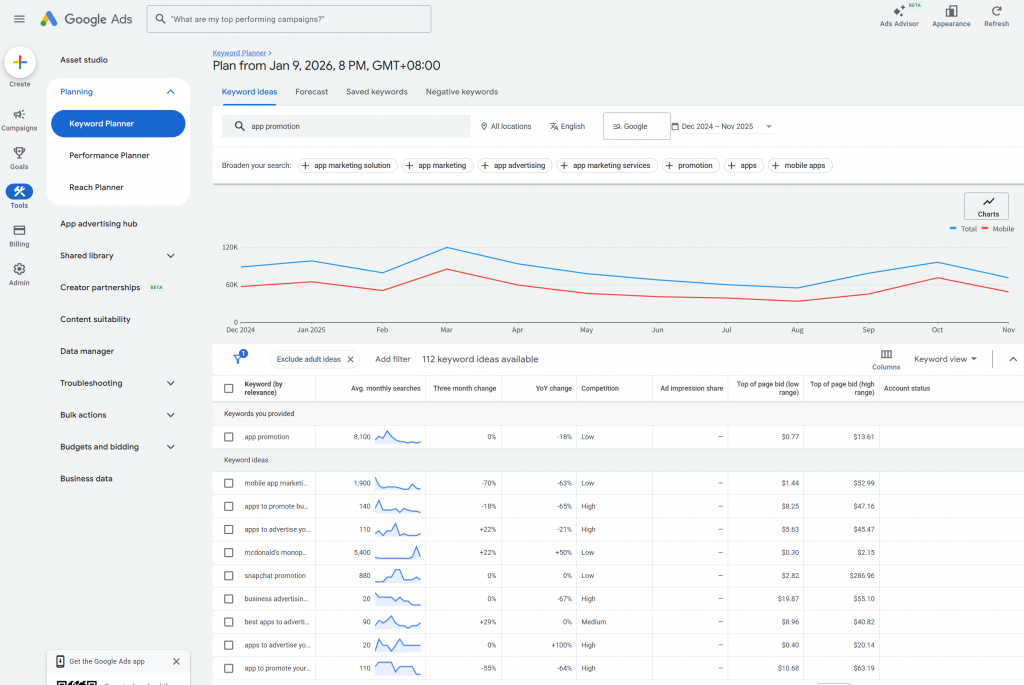
    Keyword Research (Free Methods):

    • Use YouTube autocomplete suggestions related to your niche
    • Explore low-competition keywords with tools like Google Ads
    • Review “related searches” on Google
    • Analyze competitors’ YouTube titles, descriptions, and tags within your niche

    3.2 ASO Coordination

    Use the same keywords across:

    • App title
    • Subtitle
    • App description
    • YouTube videos

    This improves discoverability when users search for your app after watching a video and strengthens ranking consistency.


    4.Community Building on YouTube: Turn Viewers into Co-Creators

    With limited budgets, word-of-mouth is your most powerful marketing channel.

    YouTube’s comment section—and the Community tab (unlocked after 1,000 subscribers)—are ideal spaces for relationship building.

    Best Practices

    • Reply to every comment, especially within the first 24 hours
    • Ask open-ended questions to encourage discussion
    • Invite users to share feature requests or usage challenges

    Once you have a small core audience, consider moving them to free community platforms like Discord or Telegram to:

    • Share exclusive updates
    • Collect feedback
    • Encourage user-generated tips and tutorials

    These users often become your strongest advocates.


    5.Collaborate with Niche Creators

    Partner with small creators (1,000–10,000 subscribers) rather than large influencers.

    They typically have:

    • Higher engagement rates
    • More authentic audiences
    • Greater willingness to collaborate in exchange for free access or feature exposure

    Choose creators whose content naturally aligns with your app’s use case.


    6.Repurpose Content for TikTok and Other Short-Form Platforms

    Do not rely solely on YouTube’s algorithm.

    Repurpose your videos into 15–60 second clips and distribute them across:

    • TikTok
    • Instagram Reels
    • X (Twitter)

    Add clear calls to action, such as:

    “Watch the full tutorial on YouTube to learn how to organize your research notes.”

    Also share content in:

    • Relevant subreddits
    • Quora answers
    • Facebook groups

    7.Metrics That Actually Matter (Avoid Vanity Metrics)

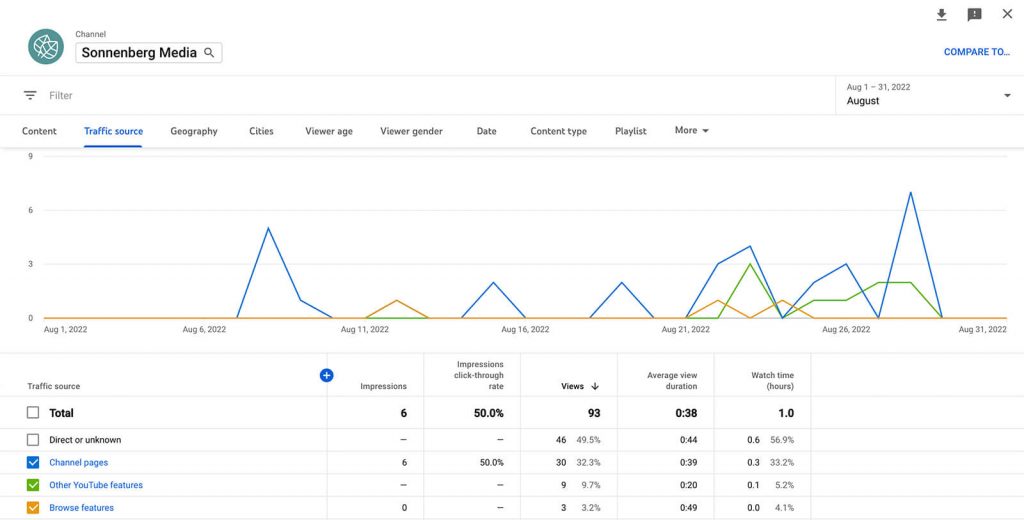
    Use YouTube Studio and focus on these core indicators:

    Watch Time

    YouTube prioritizes videos with longer watch time.

    • Target average watch time: 3+ minutes
    • Improve by optimizing the first 10 seconds or shortening videos

    Click-Through Rate (CTR)

    • Healthy CTR for niche content: 5%–10%
    • Optimize thumbnails and titles if CTR is low

    Conversion Rate

    Track how many viewers download your app.

    • Use short links (e.g., Bitly) to measure clicks
    • Track installs via App Store Connect or Google Play Console
    • Target conversion rate: 2%–5%

    Final Advice: Consistency and Patience

    Organic growth on YouTube takes time. Do not expect instant results.

    Commit to:

    • Consistent publishing (at least once per week)
    • Delivering genuine value
    • Actively engaging with your audience

    Over time, your channel will grow—and so will your app—without spending a single dollar on ads. For small-scale app developers, this is the most sustainable and cost-effective growth strategy available.

  • Top AI Video Tools for App & Game Ads: URL-to-Video and Hook-Based Generation

    As app and game marketing becomes increasingly competitive, video creatives are no longer a “nice to have” — they are the core driver of performance. With the rise of AI video generation tools, advertisers now have more options than ever to produce promotional videos at scale.

    However, not all AI video tools are built for advertising, and even fewer are truly optimized for app and game promotion. In this article, we compare the most common AI video generation approaches on the market, focusing on URL-to-video capabilities, model logic, and their limitations in real-world ad campaigns.


    The Traditional AI Video Generation Approach

    Most existing AI video tools follow a similar logic:

    • Extract screenshots, scenes, or text descriptions
    • Automatically stitch assets together
    • Apply predefined templates, transitions, and background music

    In this setup, AI essentially acts as an automated video editing assistant. While this improves production efficiency, it does not mean the AI understands the app or game itself.

    As a result:

    • The generated videos often lack clear advertising hooks
    • Creative logic is shallow or repetitive
    • The focus is on visual assembly rather than conversion performance

    More importantly, many tools are built around the idea of generating one complete video, rather than supporting the realities of modern performance marketing.


    Why “One Video” Is Not Enough for App Advertising

    In real-world advertising, success depends on:

    • Multiple creative variants
    • High-frequency testing
    • Rapid iteration and elimination

    A single polished video cannot meet these requirements:

    Most traditional AI video tools evaluate success based on how “good-looking” the output is. They emphasize clean visuals and smooth transitions while ignoring the most critical factor in short-form advertising: the first three seconds.

    Without a strong opening hook, users scroll away before the message is delivered. Fixed templates and repeated structures also lead to high creative similarity, making videos easy targets for platform duplicate-content detection.


    Two Advertising Eras: What Changed?

    Early Stage: Low Creative Pressure

    In the early days of mobile advertising, platform algorithms were relatively simple. Even with limited creative diversity, ads could still perform well. Repetitive content was tolerated, and creative fatigue built up slowly.

    Today: High Frequency, High Sensitivity

    Today’s environment is very different. AI tools are widely used, and creative production has scaled dramatically. As a result:

    • Creative homogenization is widespread
    • Ad fatigue occurs much faster
    • Platforms demand stronger early engagement signals

    Modern algorithms prioritize retention, CTR, and creative diversity. Traditional AI video generators struggle to support high-frequency, performance-driven campaigns.


    Why Hooks Decide Whether an Ad Survives

    In today’s short-form ecosystem — dominated by TikTok, Instagram Reels, and YouTube Shorts — the hook determines everything.

    The first 1–3 seconds directly impact:

    • Initial retention
    • Early CTR
    • Whether the platform continues distributing the ad

    If the hook fails, the ad never scales — regardless of how polished the visuals are.

    This is why generating multiple hooks is more important than generating one “perfect” video.


    Comparing AI Video Tools for Promotion

    Most AI-powered video generation tools for marketing purposes are more geared towards e-commerce products. They can extract product images and page descriptions from e-commerce product links to integrate video, or automatically generate complete videos based on text/script descriptions and source materials.


    1.General URL-to-Video Tools(Taking Creatify as an example)

    These ai video creation platforms convert web pages or text content into videos by summarizing and visualizing information.

    Strengths

    • Fast content-to-video conversion
    • Flexible for blogs and brand content

    Limitations

    • Not optimized for app or game promotion
    • Limited understanding of UI, gameplay, or feature hierarchies
    • Weak alignment with performance marketing needs

    2.Prompt-Based Generative Models(Taking Heygen as an example)

    Text-to-video models generate videos purely from prompts.

    Strengths

    • High creative freedom
    • Visually impressive outputs

    Limitations

    • Cannot automatically parse Google Play URLs
    • Require manual scripting and prompting
    • Not designed for scalable ad production
    • Weak connection to real product features
    • Leaning towards verbal delivery.
    • More like AI video editing tools

    The Core Limitation Across Most Tools

    Across categories, most AI video tools share the same structural limitation:

    They optimize for video creation, not advertising performance.

    They do not:

    • Understand advertising hooks
    • Generate large-scale hook variations
    • Adapt to platform-specific performance signals

    As a result, they struggle to support:

    • High-frequency campaigns
    • Creative testing at scale
    • Long-term CPI optimizationLong-term CPI optimization

    In short, existing video tools tend to focus on video synthesis based on material descriptions or emphasize character avatars and voice synthesis.


    A Hook-First Approach to AI Video Advertising

    Modern app and game advertising requires a different mindset.

    Instead of asking:

    “How do we generate a good-looking video?”

    The real question is:

    “How do we generate enough hook variations to find what actually converts?”

    With a hook-first AI approach, a single app or game can generate dozens of video variants, each with a unique opening scenario. These hooks can be tested rapidly to identify which creatives are able to scale.

    Using our AI tool, you can:

    • Input a Google Play URL
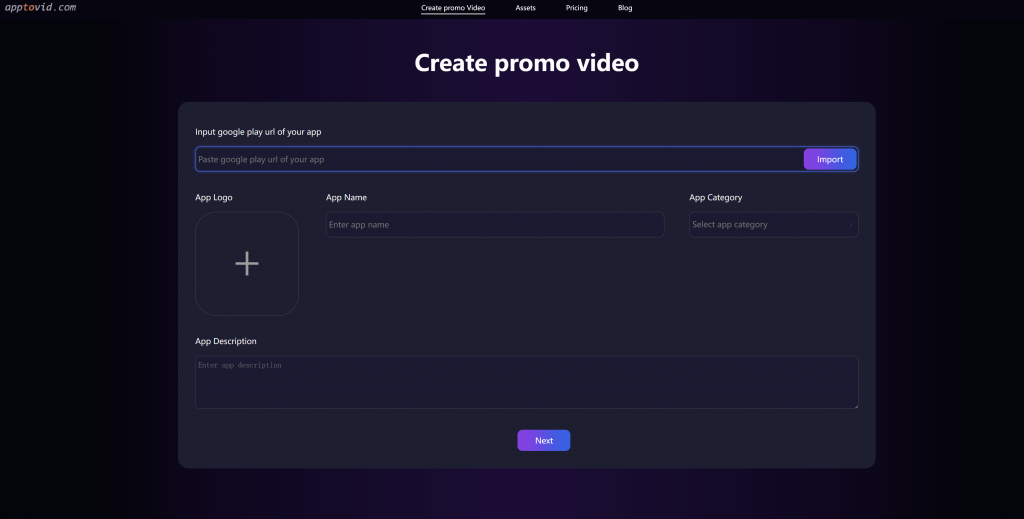
    • Wait a few minutes
    • Automatically receive multiple promotional videos with different hook openings

    Uploading screenshots or gameplay footage is optional — not required.


    Conclusion: The Future of AI Video Ads

    Traditional AI video tools helped reduce production costs. But in today’s advertising landscape, efficiency alone is no longer enough.

    The future belongs to AI systems that:

    • Understand advertising logic
    • Generate creative diversity at scale
    • Focus on hooks, testing, and performance — not just visuals

    If you are struggling with creative fatigue, limited scalability, or declining ad performance, it may be time to rethink how your AI video tools work.

    Try a hook-first approach — and let performance, not templates, decide what scales.


  • Top AI Tools for Creating Promotional Videos for Apps and Games

    The Problem with Traditional AI Video Advertising

    Most traditional ai video ads generator generate promotional videos by extracting in-game scenes, characters, and screenshots, then stitching them together with game descriptions and preset copy. In this process, AI functions more like an automated video editing tool than a true creative system.

    As a result, these tools do not understand the game itself, lack advertising “hooks,” and fail to build a coherent creative logic. Hence, the hook-up ads are often visually acceptable but creatively shallow.

    At the same time, most mainstream AI video tools on the market are designed with a single goal in mind: generating one complete video. This “single-video mindset” does not align with real-world advertising requirements, which demand multiple variants, high-frequency testing, and rapid creative iteration.

    In performance marketing, relying on a single video is not only inefficient—it is fundamentally ineffective.


    Why Traditional AI Video Ads Fail in Modern Advertising

    Another common issue is that these tools evaluate success based on how polished the visuals look, rather than how well the ad converts. They emphasize visual refinement while ignoring user behavior and platform dynamics.

    Specifically, they fail to address the critical first three seconds—the golden window where users decide whether to keep watching or scroll away. Without a strong hook, users are never placed into a relatable or compelling scenario that allows them to instantly connect with the game or app.

    Moreover, fixed templates and repetitive structures produce highly similar videos, which are easily identified by platforms as duplicate or low-value content, significantly limiting delivery potential.


    Two Advertising Eras: Then vs. Now

    To understand why this approach no longer works, it’s important to look at the evolution of advertising platforms.

    Early Stage: Low Competition, Simple Algorithms

    In the early days, platform algorithms were relatively simple. Even with limited creative assets, platforms tolerated repetitive content, and ads could still perform reasonably well.

    Today: High Frequency, High Sensitivity

    Today’s environment is entirely different. With AI tools becoming widely adopted for ad production,creative homogenization combined with high-frequency exposure has dramatically raised platform standards.

    Algorithms now demand:

    • Stronger early engagement signals
    • Higher creative diversity
    • Faster creative refresh cycles

    As a result, ad fatigue sets in faster, and traditional AI video generators can no longer support high-frequency, performance-driven advertising.


    Why Hooks Matter More Than Ever

    What modern advertisers need is not just another AI video generator, but an AI tool that can identify and generate effective entry scenarios—hooks—based on the game or app itself.

    In today’s short-form distribution ecosystem—dominated by TikTok, Instagram Reels, and YouTube Shorts—the hook determines whether an ad survives.

    Hooks capture the golden three seconds:

    • The first 1–3 seconds determine user retention
    • Retention directly affects initial CTR
    • CTR influences whether platforms continue allocating traffic

    Simply put, hooks decide whether your ad gets scaled or buried.


    Why Multiple Hooks Beat One “Perfect” Video

    In modern performance marketing:

    Generating multiple hooks is far more important than generating one “good-looking” video.

    Different hooks create completely different ad behaviors—even when using the same core visuals. Testing multiple hooks allows advertisers to quickly identify which creative angles can scale and which should be eliminated.


    A New Approach: Hook-First AI Video Generation

    With our AI tool, you can generate unlimited hook variations from the same game or app visuals. This allows you to rapidly test, iterate, and scale creatives without rebuilding videos from scratch.

    All you need to do is:

    • Input your app or game URL
    • Wait a few minutes
    • Automatically receive multiple promotional videos, each with a different hook opening

    If you want the AI to understand your product even better, you can optionally upload screenshots or video clips—but this is not required.


    Ready to Scale Your Ad Creatives?

    If you’re struggling with creative fatigue, low CTR, or limited scalability, ai video generator is built to address exactly these challenges.

    Try it now—and experience how hook-driven, scalable AI creatives can transform your app or game advertising performance.