Apparel
Shoppers can't touch the fabric, so they need to see it worn.
For fashion brands & product teams
Turn a clothing product link into AI try-on video ads. Review the garment photos, choose an available presenter and format, then edit the script before generating. Made for teams preparing ad creative, not shoppers checking their own size or fit.
AI-generated models and visuals. Review each clip before publishing.
Beyond listing photos
Use generated on-body visuals to explore a product message or styling direction. They illustrate an idea; they do not establish real fit, comfort or fabric behavior. Keep those distinctions clear when reviewing a clothing ad.
Shoppers can't touch the fabric, so they need to see it worn.
A shoe reads differently in motion than in a cutout.
Scale and proportion are hard to judge on a white background.
Same product, different model, language and hook, without a reshoot.
A clothing example
The AuraFlow athleisure top below is a sample from NovAd's demo library. The product reference and generated clothing ad belong to the same demo product; this is not a real customer's endorsement or a fit test.
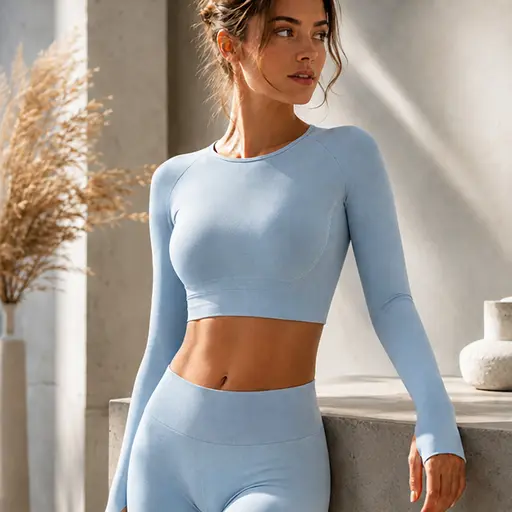
Choose sharp photos of the exact item and color you sell. Avoid cropped hems, hidden sleeves and images where another garment obscures the product.
Select an available presenter and format. Use the listing to describe a supported feature; do not infer comfort, sizing or fabric performance from a generated movement.
Check the neckline, sleeves, hem, seams, color and printed details against the source. Do not publish a clip that changes the item, distorts a logo or invents a feature.
Two formats for clothing ads
Available formats depend on the product; the creation flow shows which ones your link supports.
An AI presenter wears the item and explains selected product details. Use a reviewed script based on the listing, not a claim that the presenter personally wore or tested the garment.
The garment carries the video: on-body shots and styling sequences with a lighter voiceover. Built for feeds where people scroll before they read.
Keep the product the same and change the model, the outfit pairing or the opening hook. Test the versions against each other before you commit budget.
Your listing is the starting point
Supported sources include Amazon, Shopify, TikTok Shop and Shopee.
Selling points, price and product photos are pulled in; correct anything that's off before the script is written.
Choose the presenter and whether the clip runs as Try-on Talk or Try-on Show.
Edit them, set language and length, then generate the batch.
Ad creative, not a fitting room
If you searched for AI try on clothes, these are two different tools, and it's worth being clear about which one you need.
A virtual try-on app takes a shopper's own photo and shows that person in the garment. It lives on the storefront, and the shopper is the user.
NovAd produces try-on ad creative for the team selling the item. The clip goes into a campaign - Meta, TikTok, a product page - and the audience is whoever the ad targets. You don't upload a customer photo, and the model in the video is generated, not a real shopper.
This workflow creates ads for the team selling the garment. It does not design clothing, replace outfits in an existing video, or provide a shopper-facing size and fit prediction.
A different production rhythm
Generate a draft for a suitable product message. Keep real filming for exact fabric movement, physical tests and genuine customer experience.
Different model, hook and language from the same product link.
The listing supplies the brief, not a guarantee of visual accuracy. Compare the garment and claims with your source before approving each clip.
Before you generate
Explore supported links on the homepage or check batch sizes on the pricing page.